

XOS Settings

Recommended XOS settings - an overview of the main in-car menus.

A map of the in-car Settings menu with community-recommended picks. XPENG packs a lot into the infotainment Settings app - this guide mirrors the XOS menu tree section by section. Part of the Guides collection under Software.

Menu labels below follow typical EN XOS wording on a European G9 (5.6.0 reference build). Your car may differ by language, market, and version. Green highlights mark community-recommended picks.
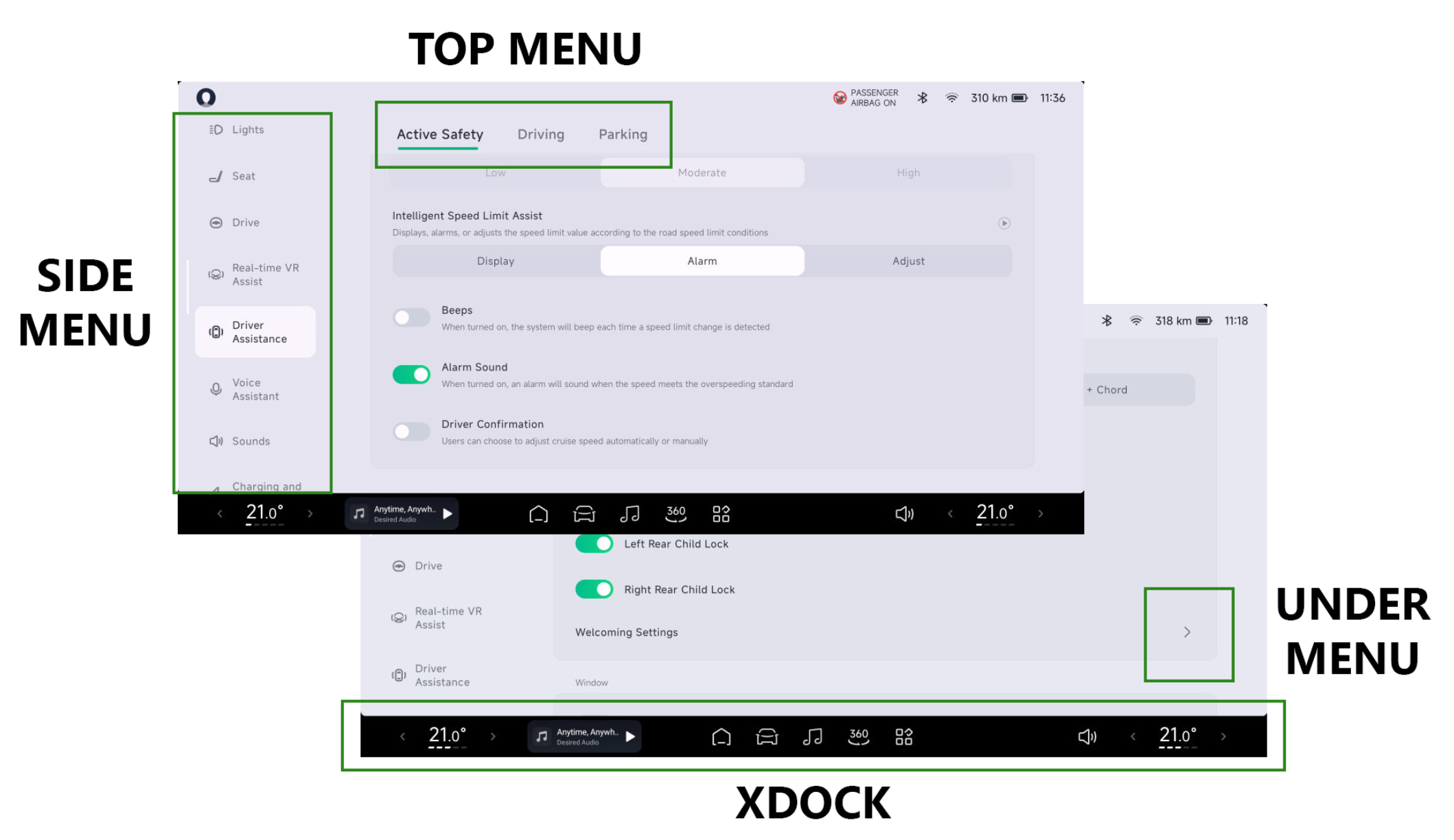
XPENG infotainment Settings menu overview

How to open: Tap the car / Settings icon on the main screen.

XOS menu

Each accordion section matches a Settings category in the car. Expand a section to read its options - pane titles follow the XOS menu order. Green values are community picks on XOS 5.6.0. Availability differs by market, trim, and software version.

Vehicle

Mostly information in this menu, including:

  • Tyre pressure
  • Energy consumption

Also adjustable in this menu:

  • Reset trip meters
  • Front wiper service mode (for blade replacement or hand-washing)
  • Rear wiper service mode(for blade replacement or hand-washing)
  • Breakdown / hazard mode

Doors & Windows

  • Unlock feedback:
    • Lights flash (pick this for no sound outside)
    • Flash and horn
    • Flash and sound
  • Door handles extend on unlock: On
  • Lock feedback:
    • Lights flash (pick this for no sound outside)
    • Flash and horn
    • Flash and sound
  • Lock doors: Off (status display; manual control)
  • Auto-unlock when parked: On
  • P-gear shortcuts: On (shows shortcuts when shifted to P)
  • Close windows when locking: On
  • Auto-close windows at high speed: Off
  • Hands-free tailgate (kick sensor): On (G9 2023 only)

Also adjustable in this menu:

  • Baby-in-car mode (windows, seats, doors)
  • Rear passenger door shortcut:
    • Toggle quiet mode
    • Disable
    • Passenger seat control
  • Auto wiper sensitivity: (four levels)
  • Tailgate opening angle

Doors & Windows - Welcome settings

  • Driver seat: On
  • Passenger seat: On
  • Rear seats: On
  • Welcome sound effects: On (welcome sound inside the cabin)
    • Universe
    • Interstellar
    • Skyline
    • Ignition
  • Auto-enable guest mode: Off

Lights

  • Headlight height: Level 3
  • Headlight control: AUTO
  • Position light settings: Light strip
  • Intelligent high/low beam assist: Off (not used yet - feature still maturing)
  • Follow me home: On
  • Headlight delay-off time: 15 seconds
  • Reading lights: Off (status display; manual control)
  • Reading light brightness: High
  • Enable light signal on unlock: On
  • Enable light signal on lock: On
  • Vehicle unlock light signal: Growing
  • Light signals while charging: Off

Also adjustable in this menu:

  • Cabin ambient lighting is also controlled here (Ambient light).

Seats

Personal seat and massage preferences.

Assign side-button function: Massage and thigh support or Lumbar support.

Driving

  • Drive profile (your choice - this author uses Individual with these settings):
    • Accelerator response: Sport
    • Steering effort: Standard
    • Regeneration: Medium
  • Auto-hold: On
  • Hill descent speed control: Off
  • ESP electronic stability: On
  • Electronic parking brake: On
  • Passenger airbag: On

VR Assistant / real-time SR assist

  • Alarm for hazardous driving conditions: On
  • Reminder when vehicle ahead moves: On

Driver Assist - Active safety

  • Forward collision warning: On
  • Forward collision sensitivity: High
  • Obstacle avoidance assist: On
  • Lane assist:
    • Off
    • Warning
    • Warning + correction
  • Emergency lane assist:
    • Off
    • Warning + correction
    • Early warning + correction
  • Lane assist sensitivity:
    • Low
    • Moderate
    • High
  • Blind spot detection: On
  • Door open warning: On
  • Rear collision warning: On
  • Rear cross-traffic warning: On
  • Automatic emergency braking when reversing: On
  • Driver fatigue warning: On (EU rules: must be turned off each trip)
  • Fatigue monitoring: On
  • Fatigue monitoring sensitivity:
    • Low
    • Moderate
    • High
  • Speed assist:
    • Shows speed
    • Advises driver
    • Adjusts speed automatically
  • Notification sound for new speed limit: Off
  • Alarm when exceeding speed limit: On (EU rules: must be disabled manually each trip)
  • Manual confirmation for speed adjustment: Off

Driver Assist - Driving

  • Lane centering assist (LCC): On
  • Automatic lane change: On

Driver Assist - Parking

  • Intelligent parking assist: On
  • Reversing camera: On
  • Intelligent parking assist sound:
    • Voice
    • Sound effect

Voice Assistant

  • XPENG Assistant voice control: On
  • “Hey XPENG” wake phrase: On
  • Instant response: On
  • Voice control language: English
  • Continuous conversation:
    • Short
    • Shorter
    • Longer
  • Voice control zones:
    • Driver seat: On
    • Passenger seat: On
    • Left rear seat: On
    • Right rear seat: On
  • Show voice control transcript: On

Sounds

  • Low-speed drive sound (exterior low-speed sound cannot be disabled - EU requirement):
    • Time warp
    • Spacecraft
    • Combustion engine
  • Steering-wheel adjustment:
    • Current sound
    • Media sound
  • Silent mode - mute front seats: Off
  • Silent mode - mute rear seats: Off
  • Speed-based volume:
    • Low
    • Medium
    • High
  • Safety warning volume:
    • Low
    • Medium
    • High
  • System warning sounds: Enabled
    • Button sound: Off
    • Charger connected (exterior): Off
    • Turn signal beep: Off
    • Drive mode sound effects: On
  • Directional warning sounds: On
  • Lower volume during navigation: On
  • Lower volume when door opens: On (driver door only - automate all doors with XCOMBO)
  • Reduce media volume when reversing: On

Also in this menu:

  • Media sound effects
    • Dynamic
    • Cinema
    • Original sound
  • Sound profile (equalizer)
  • Spatial sound effects:
    • Level 0
    • Level 1
    • Level 2
    • Level 3
  • Driver sound settings:
    • Mode:
      • Shared sound
      • Driver-focused
      • Private
    • Intelligent sound focus switching: On
  • Boombox Mode
  • Fun exterior sound effects
  • Volume per source

Charging

  • Charge limit: 100% (Standard Range with LFP battery)
  • Battery protection: On
  • Range display:
    • WLTP
    • Dynamic
  • Show battery percentage: On
  • Battery preconditioning (DC fast charging): On
  • Slow charging settings (AC): 16A

Also in this menu:

  • Schedule slow charging (AC)
  • Schedule battery preconditioning in cold weather (AC)
  • Manual battery prep for fast charging (DC)

Charging - Power supply (V2L)

  • Power limit: 20%
  • Delayed power-off (12V outlet): Disabled
  • Wireless charging on driver side (phone pad): On

Camera

  • Transparent car: On
  • 3D transparent car view: On
  • 360 camera auto disconnect: Off
  • Rear camera when turning: On
  • Rear view display:
    • Touchscreen
    • Instrument cluster
  • 360 camera on narrow passages: On
  • Activation distance:
    • Close
    • Medium
    • Far
  • Camera view:
    • 360 camera
    • 360 camera + side cameras
  • Sentry Mode: Off (Enable manually or via XCOMBO)
  • Sentry Mode sensitivity:
    • Low
    • Medium
    • High

Screens

Mostly personal display preferences in this menu, including:

  • Screen brightness
  • Turn passenger screen on/off
  • Day / night mode
  • Font size
  • Screen cleaning mode (also in pull-down menu)
  • Standby mode

Connections

  • Bluetooth: On
  • Allow Bluetooth discovery: On
  • Wi-Fi: On (connected to home Wi-Fi)
  • Use car as hotspot: Disabled (enable per trip - automate with XCOMBO)
  • Hotspot band:
    • 5 GHz
    • 2.4 GHz

About

  • Update settings:
    • Automatic upgrade: On
  • Language, region, and time:
    • Language: Danish
    • Region: Denmark
    • Automatic time zone: On
    • Time format:
      • 12 hour
      • 24 hour
    • Speed unit:
      • km/h
      • mph
    • Temperature unit:
      • C
      • F
    • Pressure unit:
      • kPa
      • bar
      • psi
  • Security and privacy:
    • Cloud data sync: On
    • Driver screen app restrictions: Disabled (allows browser and streaming apps on the main display - do not use while driving)
    • Left-phone reminder: On
    • Automatic shutdown: On
    • Use in-cabin microphone: On
    • Voice assistant UX improvement program: Off
    • XPILOT Assist:
      • Share risk event data: On
      • Share road segment data: On
    • Automatic updates: On

Other items in this menu:

  • Storage
  • Check for updates
  • View VIN
  • View XOS version
  • Erase data
  • Restore factory settings

For OTA update behaviour see XPENG OTA. For automation shortcuts see XCOMBO. Release notes for your build may add or rename items - check XOS Releases.